Introduction
Data has become one of the most valuable assets for organizations of every size. From customer information and financial records to business documents and collaboration files, companies rely on data to drive decisions, improve customer experiences, and maintain daily operations. However, as technology continues to evolve, businesses often find themselves using outdated systems, legacy applications, or storage platforms that no longer meet their growing needs. This is where data migration becomes essential.
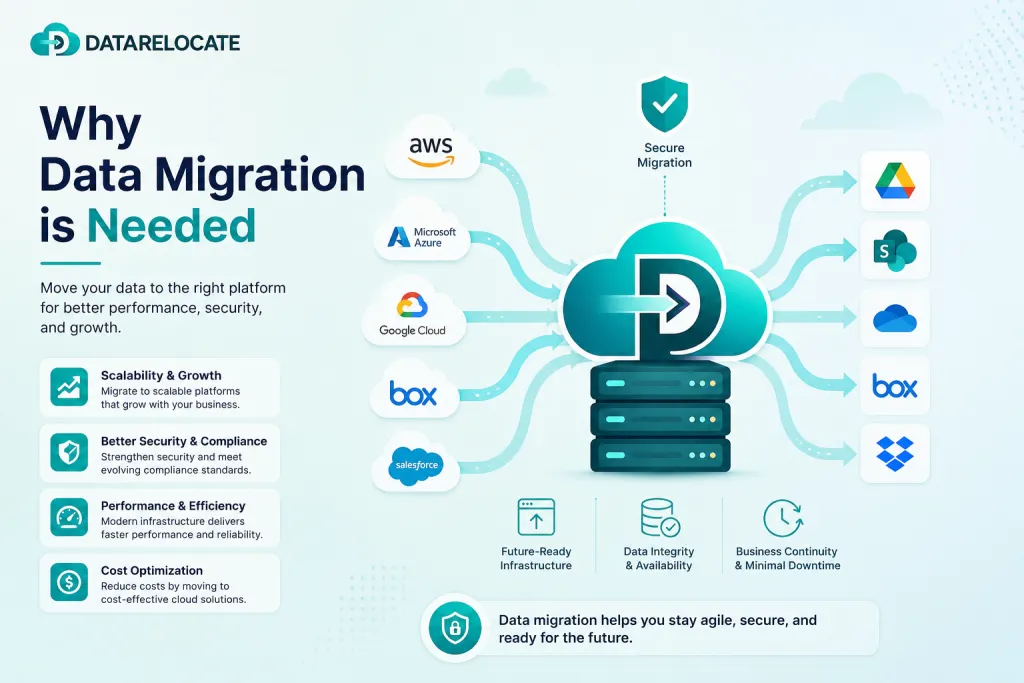
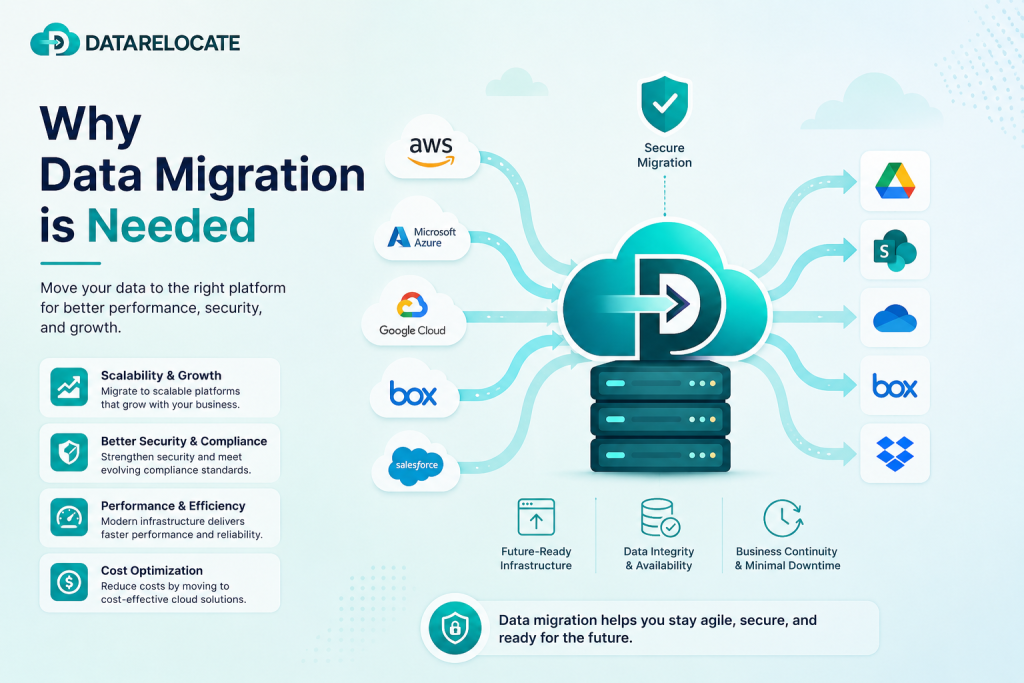
Data migration is the process of transferring data from one system, storage platform, application, or cloud environment to another while preserving its integrity, security, permissions, and usability. Whether an organization is moving from an on-premises infrastructure to the cloud, switching collaboration platforms, upgrading storage systems, or consolidating business applications, data migration ensures that critical information remains accessible without disrupting business operations.
Today’s digital-first world demands scalability, security, and flexibility. Organizations that fail to modernize their data infrastructure often face increased operational costs, security vulnerabilities, compliance challenges, and reduced productivity. Data migration is no longer just an IT activity—it is a strategic business initiative that enables organizations to stay competitive in an increasingly data-driven economy.
What Is Data Migration?
Data migration refers to the structured process of moving digital information from one location to another. The migration may involve:
- Cloud-to-cloud migration
- On-premises to cloud migration
- Cloud to on-premises migration
- Email migration
- File server migration
- Storage migration
- Database migration
- Application migration
- Content management system migration
Modern migration projects involve much more than simply copying files. Businesses need to preserve metadata, permissions, version history, folder structures, shared links, comments, and user access while ensuring data security throughout the migration process.
Why Data Migration Is More Important Than Ever
The rapid growth of cloud computing, hybrid work environments, artificial intelligence, and digital transformation initiatives has dramatically increased the importance of data migration.
Organizations generate enormous volumes of data every day. As this data grows, businesses require more scalable, secure, and intelligent platforms that support collaboration and automation.
Without effective migration strategies, organizations risk:
- Data silos
- High infrastructure costs
- Compliance issues
- Security vulnerabilities
- Reduced employee productivity
- Business downtime
A successful migration ensures that businesses can continue operating efficiently while embracing modern technologies.
Key Reasons Why Businesses Need Data Migration
1. Cloud Adoption and Digital Transformation
Cloud computing has become the foundation of modern business operations. Organizations are increasingly moving away from traditional servers and legacy infrastructure to cloud platforms such as Microsoft 365, Google Workspace, Dropbox Business, SharePoint Online, Box, and OneDrive.
Cloud platforms provide:
- Anywhere access
- Improved collaboration
- Automatic updates
- Better disaster recovery
- Reduced infrastructure costs
- Greater scalability
Data migration enables organizations to transition smoothly without losing valuable business information.
Explore Data Relocate migration services for content, email, and chat workloads across 50+ cloud platforms.
2. Improving Business Productivity
Employees need quick and reliable access to information to perform their daily tasks. Legacy systems often slow down collaboration due to outdated interfaces, limited integrations, or inefficient file management.
Modern cloud platforms provide:
- Real-time collaboration
- Faster search capabilities
- Integrated communication tools
- Mobile accessibility
- Automated workflows
Migrating data allows teams to work more efficiently while reducing time spent searching for files or managing outdated systems.
3. Reducing IT Infrastructure Costs
Maintaining physical servers requires continuous investment in:
- Hardware upgrades
- Power consumption
- Cooling systems
- Software licenses
- Maintenance contracts
- IT personnel
Cloud-based environments significantly reduce these operational expenses by offering scalable, subscription-based services. Organizations only pay for the storage and resources they actually use.
Data migration plays a key role in helping businesses lower total cost of ownership while improving operational efficiency.
4. Enhancing Security
Cybersecurity threats continue to evolve. Older systems often lack advanced security features, making them vulnerable to ransomware, phishing attacks, and unauthorized access.
Modern cloud platforms provide:
- Multi-factor authentication (MFA)
- End-to-end encryption
- Role-based access control
- Continuous security monitoring
- Automatic security updates
- Threat detection and response
Migrating data to secure environments helps organizations better protect sensitive information while reducing security risks.
5. Supporting Remote and Hybrid Work
Remote work has become a permanent part of many organizations. Employees now access business data from offices, homes, and mobile devices around the world.
Traditional file servers are not designed for distributed teams.
Cloud platforms provide:
- Secure remote access
- Real-time collaboration
- File synchronization
- Cross-device accessibility
- Simplified document sharing
Data migration enables organizations to support flexible work environments without compromising productivity or security.
Explore Data Relocate migration services for content, email, and chat workloads across 50+ cloud platforms.
6. Regulatory Compliance
Many industries must comply with regulations such as GDPR, HIPAA, ISO standards, SOC 2, and other regional data protection laws.
Modern cloud platforms offer built-in compliance features including:
- Audit logs
- Data retention policies
- Access monitoring
- Encryption
- Legal hold capabilities
Migrating data to compliant platforms helps organizations meet regulatory requirements more effectively while reducing legal and financial risks.
7. Better Disaster Recovery and Business Continuity
Unexpected events such as hardware failures, cyberattacks, or natural disasters can result in significant data loss.
Modern cloud environments provide:
- Automatic backups
- Geographic redundancy
- High availability
- Rapid recovery options
- Version history
Data migration helps organizations strengthen disaster recovery strategies and minimize downtime during unexpected incidents.
Common Business Scenarios That Require Data Migration
Organizations perform data migration for various reasons, including:
- Mergers and acquisitions
- Company restructuring
- Cloud adoption initiatives
- Legacy system replacement
- Email platform migration
- Storage optimization
- Business expansion
- Application modernization
- Digital workplace transformation
Each scenario requires careful planning to ensure that data remains complete, secure, and accessible.
Request a custom migration quote or review our pre-migration reports to plan delta windows before your first bulk pass.
Challenges of Data Migration
Although data migration offers many benefits, it also presents several challenges.
Large Data Volumes
Migrating terabytes or petabytes of data requires careful planning to avoid network congestion and lengthy migration windows.
Downtime Risks
Poorly planned migrations may interrupt business operations and affect employee productivity.
Data Integrity
Missing files, corrupted records, or incomplete transfers can create serious operational issues.
Permission Preservation
Incorrect permissions may expose sensitive information or prevent authorized users from accessing critical data.
Compatibility Issues
Different platforms often store information differently, requiring data transformation during migration.
Using automated migration tools significantly reduces these risks while improving migration accuracy.
Best Practices for Successful Data Migration
A successful migration project involves more than moving files. Organizations should follow several best practices.
Assess Existing Data
Understand the volume, structure, permissions, ownership, and quality of existing data before migration begins.
Clean Up Unnecessary Data
Remove outdated files, duplicate content, and obsolete records to reduce migration complexity.
Plan the Migration
Develop a detailed migration strategy that includes timelines, responsibilities, validation procedures, rollback plans, and user communication.
Perform Pilot Testing
Test migrations on a smaller dataset before executing the full migration.
Preserve Critical Information
Ensure that important attributes such as:
- Metadata
- Version history
- Permissions
- Shared links
- Comments
- Folder hierarchy
are retained throughout the migration process.
Validate the Results
After migration, verify that all files, permissions, and data relationships have been transferred accurately.
The Role of Automation in Modern Data Migration
Manual migration processes are time-consuming and prone to errors.
Modern migration solutions automate many critical tasks, including:
- User mapping
- Permission migration
- Metadata preservation
- Incremental synchronization
- Delta migration
- Scheduling
- Reporting
- Error handling
Automation improves migration speed while reducing business disruption.
Future Trends in Data Migration
As organizations continue embracing digital transformation, data migration technologies are becoming increasingly intelligent.
Emerging trends include:
- AI-assisted migration planning
- Automated data classification
- Predictive migration analytics
- Zero-downtime migration
- Multi-cloud migration strategies
- Hybrid cloud management
- Intelligent compliance monitoring
- Automated validation and reporting
These innovations will make migrations faster, safer, and more efficient while reducing manual effort.
Conclusion
Data migration has evolved from a simple IT operation into a critical business strategy. In today’s digital landscape, organizations must continuously adapt to new technologies, changing customer expectations, evolving security threats, and increasing regulatory requirements. Migrating data enables businesses to modernize infrastructure, improve collaboration, reduce operational costs, strengthen security, and support long-term growth.
Whether an organization is adopting cloud services, consolidating multiple platforms, upgrading legacy systems, or enabling remote work, a well-planned data migration ensures business continuity and preserves valuable information throughout the transition.
Success depends on careful planning, choosing the right migration tools, validating migrated data, and preserving essential elements such as permissions, metadata, folder structures, and version history. Businesses that invest in efficient data migration are better equipped to innovate, scale operations, and remain competitive in an increasingly data-driven world.
In an era where data fuels every business decision, effective data migration is not merely a technical requirement—it is a strategic investment that empowers organizations to unlock the full value of their information and confidently embrace the future.