
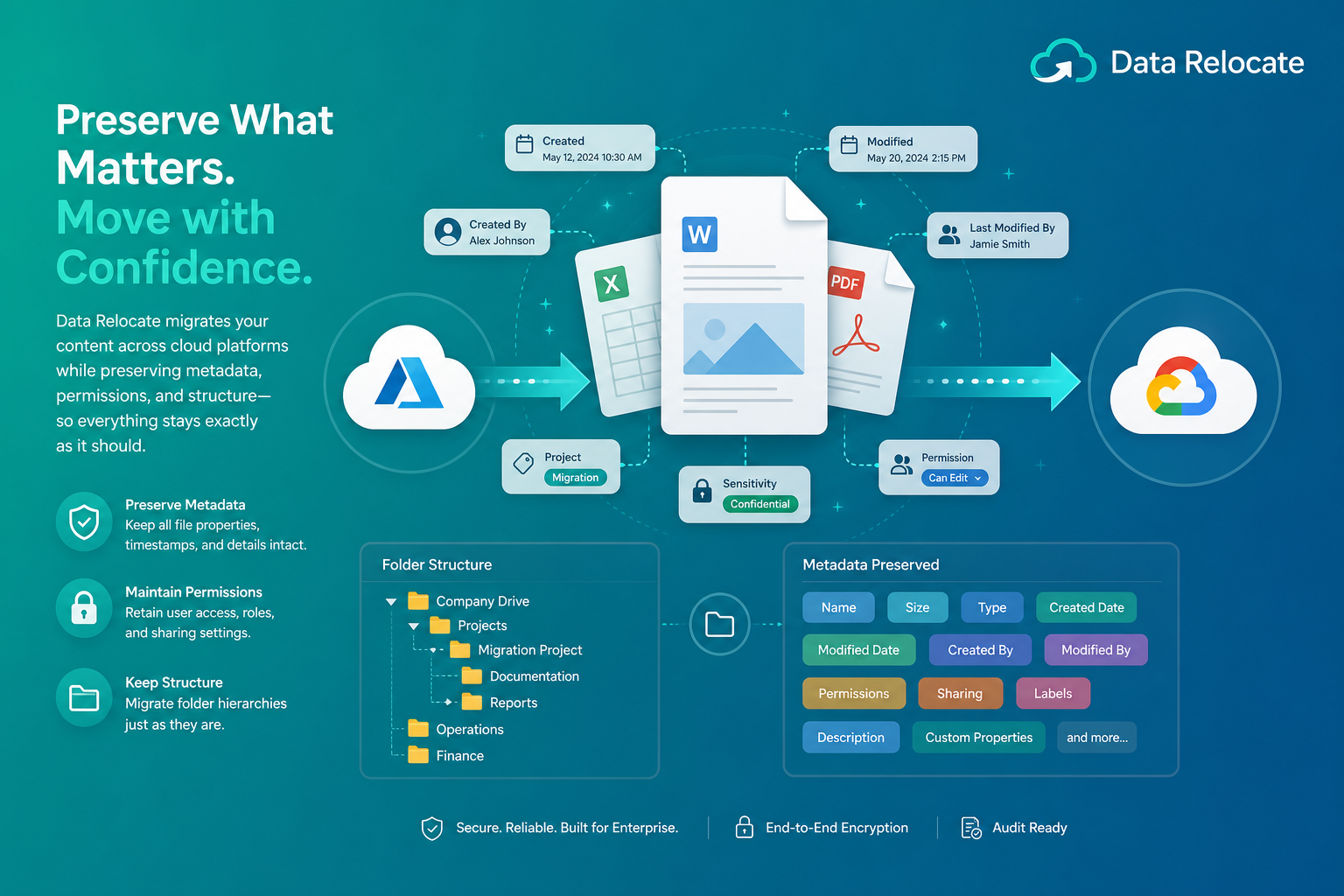
Metadata preservation ensures that timestamps, ownership, permissions, labels, and custom properties survive cloud migration—not just file content. Organizations maintain compliance, governance, and productivity when every document keeps its digital fingerprint on the destination platform.
What Is Metadata Preservation?
Metadata preservation refers to maintaining important file attributes and properties when migrating content from one cloud platform to another. While file content is often the primary focus of migrations, metadata provides the context that organizations rely on for governance, compliance, collaboration, and searchability.
Without proper metadata preservation, businesses risk losing critical information about their files and documents. Metadata migration ensures that documents remain organized, searchable, and compliant after migration.
Why Metadata Matters
Metadata acts as the digital fingerprint of a file. It helps organizations maintain compliance, improve searchability, support governance, and preserve business context.
Maintain Compliance
Regulations often require creation dates, modification history, ownership information, and audit records.
Improve Searchability
Metadata makes it easier for employees to locate documents quickly across large libraries.
Support Governance
File labels, classifications, and retention settings depend on accurate metadata.
Preserve Business Context
Metadata tells users who created a file, when it changed, how it is categorized, and which team owns it.
Types of Metadata That Should Be Preserved
Created Date
Modified Date
File Ownership
Last Modified By
Custom Metadata Fields
Labels and Classifications
Permissions Metadata
Version Metadata
Folder Hierarchy
Challenges in Metadata Migration
Metadata migration can be significantly more complex than file migration. Every cloud provider stores attributes differently, and API limits affect what can be read and written on the destination.
Platform Differences
Google Drive, SharePoint, Box, Dropbox, and OneDrive use different metadata models and permission structures.
API Limitations
Some providers restrict access to certain metadata attributes through their APIs.
Custom Fields
Unique organizational metadata structures require explicit mapping during migration.
Permission Dependencies
Metadata preservation frequently depends on successfully migrating permissions and ownership.
Business Benefits of Metadata Preservation
- Better compliance — maintain regulatory requirements and audit readiness.
- Improved user experience — employees access files with familiar classifications and ownership.
- Faster search results — retain indexing information and metadata-based search.
- Reduced migration risk — prevent loss of business-critical context.
- Enhanced governance — maintain retention policies and classification structures.
How Data Relocate Preserves Metadata
Data Relocate provides enterprise-grade metadata migration capabilities with intelligent mapping, validation, and reporting at scale.
Supported Metadata Types
- Created and modified dates
- File ownership and user information
- Custom metadata fields, labels, and tags
- Version information and folder structures
- Sharing and permissions metadata
Intelligent Metadata Mapping
The platform automatically maps metadata structures between different cloud platforms, reducing manual configuration for large programs.
Validation and Reporting
After migration, Data Relocate verifies metadata integrity and generates comprehensive migration reports for IT and compliance teams.
Scalable Architecture
Supports millions of files and metadata records while maintaining performance and accuracy across enterprise tenants.
Common Migration Scenarios
SharePoint to SharePoint
Maintain document properties, version metadata, and permissions across sites or tenants.
Google Drive to OneDrive
Preserve timestamps, ownership, and folder structures during Microsoft 365 moves.
Box to SharePoint
Transfer custom metadata and classification labels into SharePoint libraries.
Dropbox Business to Microsoft 365
Retain governance information and access controls on the destination.
Best Practices for Metadata Preservation
- Audit existing metadata — understand what fields and classifications exist before migration.
- Clean up unused metadata — remove obsolete fields and classifications when policy allows.
- Define mapping rules — map source metadata fields to destination equivalents.
- Test before full migration — validate metadata preservation using pilot migrations.
- Verify post-migration results — compare metadata records between source and destination.
Combine metadata preservation with delta migration and version history migration for complete file intelligence on the destination.
Frequently Asked Questions
What happens if metadata is not preserved during migration?
Organizations may lose important information such as ownership, timestamps, classifications, audit records, and searchability—creating compliance and productivity gaps.
Can custom metadata fields be migrated?
Yes. Data Relocate supports migration of custom metadata fields where supported by source and destination platforms.
Are file timestamps preserved?
Yes. Created and modified dates are maintained whenever destination platforms support them.
Does metadata preservation affect migration speed?
Metadata processing can add complexity, but Data Relocate optimizes transfers to minimize impact on overall project timelines.
Can permissions metadata be migrated as well?
Yes. Data Relocate supports migration of permissions and access control metadata alongside file attributes.
Conclusion
Metadata is often as valuable as the files themselves. It provides context, compliance information, governance controls, and search capabilities that organizations rely on every day.
Successful cloud migrations require more than simply transferring files. They require preserving the critical metadata that keeps business information organized, secure, and compliant. Data Relocate metadata preservation capabilities ensure organizations maintain complete file intelligence throughout every stage of migration.