Understanding Email Migration in 2026
What Is Email Migration?
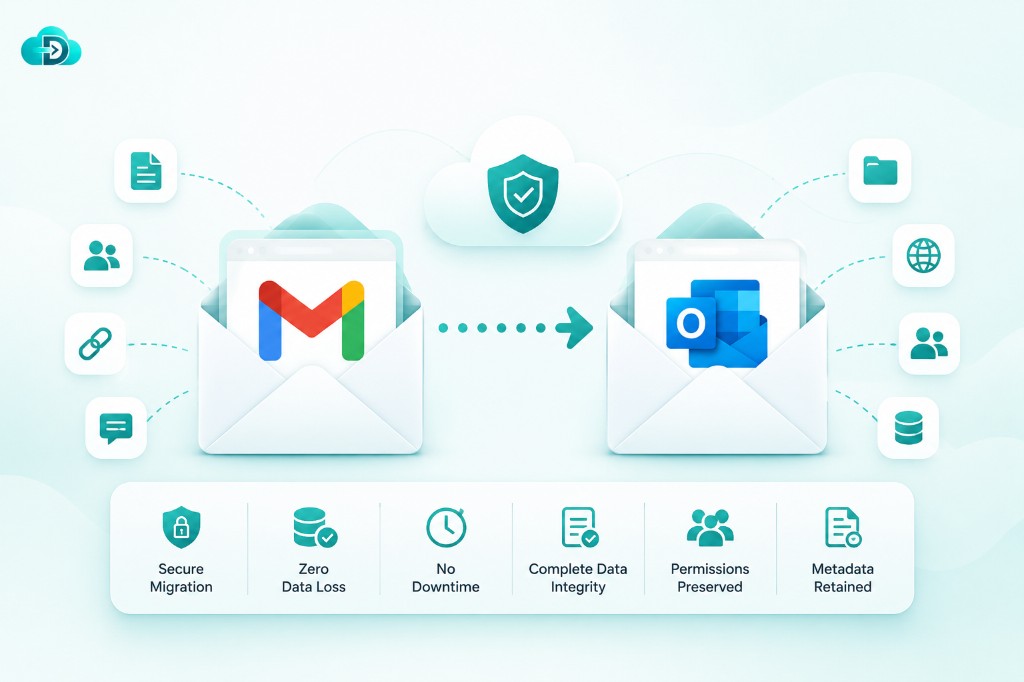
Email migration is the process of moving email data, user accounts, calendars, contacts, archives, permissions, and related communication assets from one email environment to another. In 2026, email migration is no longer limited to simply transferring messages from one mailbox to another.
Modern organizations expect a complete transition of their digital communication ecosystem, including collaboration tools, shared mailboxes, retention policies, security configurations, and AI-powered productivity settings.
Think of email migration as relocating an entire corporate headquarters rather than moving a single employee’s desk. Every document, communication record, workflow, permission structure, and collaboration process must arrive intact at the destination.
Whether a company is moving from an on-premises Exchange server to Microsoft 365, switching from Google Workspace to Microsoft 365, or performing a tenant-to-tenant migration after a merger, the complexity involved is significantly greater than most organizations initially anticipate.
Why Businesses Are Migrating More Than Ever
The demand for email migration services has increased dramatically as businesses modernize their technology infrastructure. The rise of cloud-first strategies, AI-powered workplace tools, hybrid work environments, and stricter compliance regulations are major drivers behind migration projects.
Microsoft 365 continues to dominate enterprise collaboration, with approximately 450 million commercial users worldwide, while Google Workspace has surpassed 3 billion monthly active users and more than 11 million paying customers globally.
Explore Data Relocate email migration paths for Gmail, Outlook, and Zoho Mail.
The Evolution of Email Migration Services
From Basic Mail Transfers to Intelligent Migration
The shift toward cloud-native workplaces has raised expectations around migration outcomes. Businesses no longer accept prolonged downtime or weeks of post-migration troubleshooting. Instead, they demand seamless cutovers, automated validation, and detailed reporting that verifies every mailbox has been migrated successfully.
Migration providers have responded by developing intelligent platforms capable of handling millions of mailboxes across global enterprises. Advanced automation reduces manual intervention while improving accuracy. Detailed dashboards provide real-time visibility into migration progress, helping IT teams track performance and resolve issues before they impact users.
The modern migration process emphasizes business continuity above all else. Incremental synchronization, delta migration capabilities, and coexistence features allow organizations to continue operating normally while large-scale migrations occur in the background.
How AI Is Transforming Migration Projects
Artificial intelligence is rapidly changing how migration projects are planned and executed.
AI-driven analytics can assess source environments, identify potential risks, estimate migration timelines, and recommend optimization strategies before migration even begins.
Many organizations adopting Microsoft 365 are simultaneously embracing AI-powered productivity solutions. Recent reports indicate substantial enterprise investments in Microsoft 365 Copilot, with major organizations such as Infosys, TCS, and Wipro scaling deployments to more than 300,000 employees collectively.
AI also enhances migration accuracy by automatically detecting anomalies, permission mismatches, duplicate data, and configuration conflicts. Instead of relying solely on manual reviews, migration teams can use predictive insights to proactively address issues.
Common Types of Email Migration
On-Premises to Cloud Migration
On-premises to cloud migration remains one of the most common migration scenarios in 2026. Many organizations continue to retire legacy Exchange servers and aging infrastructure in favor of cloud platforms such as Microsoft 365 and Google Workspace.
The primary advantage of cloud migration is scalability. Organizations can eliminate hardware maintenance, reduce operational costs, and gain access to enterprise-grade security and compliance capabilities.
Cloud providers also offer higher availability, automatic updates, and integrated AI services that would be difficult or expensive to implement on-premises.
Migration projects of this nature often involve large amounts of historical data, archived mailboxes, and complex permission structures.
Cloud-to-Cloud Migration
Cloud-to-cloud migrations are increasingly popular as businesses evaluate competing productivity ecosystems.
Organizations may move from Google Workspace to Microsoft 365, Microsoft 365 to Google Workspace, or between different cloud environments for strategic reasons.
These migrations are often more complex than expected because each platform stores data differently.
Mailboxes may migrate easily, but calendars, permissions, contacts, and collaboration settings require specialized handling.
Businesses must also consider user experience, training requirements, and application integrations.
Tenant-to-Tenant Migration
Tenant-to-tenant migrations frequently occur during mergers, acquisitions, divestitures, and organizational restructuring. These projects involve transferring users and data between separate Microsoft 365 or Google Workspace environments.
One of the biggest challenges is maintaining email continuity. Domains can typically only exist in one tenant at a time, making cutover planning critical. Migration providers often employ advanced coexistence strategies to reduce disruption during domain transitions.
Successful tenant migrations require careful coordination, extensive testing, and clear communication.
When executed properly, users can continue working with minimal interruption despite significant backend changes.
Key Components Migrated During an Email Migration
Mailboxes, Contacts, Calendars, and Archives
A comprehensive migration involves far more than email messages. Businesses expect the preservation of contacts, calendars, recurring meetings, tasks, notes, mailbox archives, and historical communication records.
A missing calendar entry or lost archive may disrupt business operations, affect customer relationships, or create compliance concerns.
Permissions, Rules, and Shared Resources
Permissions are among the most overlooked elements of migration planning. Shared mailboxes, delegation settings, inbox rules, distribution groups, and resource calendars play essential roles in daily business operations.
When permissions fail to migrate correctly, users may lose access to critical resources, resulting in productivity disruptions. Modern migration platforms therefore place significant emphasis on preserving access rights and validating permission structures post-migration.
Organizations should create detailed inventories of shared resources before migration begins. This ensures that collaboration workflows continue functioning correctly once users transition to the new platform.
Business Benefits of Professional Email Migration Services
Improved Productivity
A professionally managed migration significantly improves productivity by reducing downtime and ensuring a seamless user experience. Employees can continue accessing communications, collaborating with colleagues, and serving customers without major interruptions.
The latest generation of cloud platforms also integrates AI capabilities directly into daily workflows. Research indicates that AI assistants are increasingly becoming part of everyday business operations, helping users with writing, analysis, information retrieval, and decision-making activities.
By migrating to modern platforms, organizations gain access to these productivity enhancements while simultaneously reducing administrative complexity. Centralized management, automated updates, and integrated collaboration tools contribute to a more efficient workplace environment.
Enhanced Security and Compliance
Cybersecurity remains a primary concern for organizations worldwide. Modern email platforms provide advanced threat protection, data loss prevention, encryption, multi-factor authentication, and compliance monitoring capabilities.
Professional migration providers ensure that security controls remain intact throughout the migration process. Sensitive data is protected during transfer, while compliance requirements are maintained across jurisdictions and regulatory frameworks.
For industries such as healthcare, finance, legal services, and government, maintaining compliance is often a critical success factor. Experienced migration specialists understand these requirements and design migration strategies that minimize risk while preserving regulatory adherence.
Challenges Businesses Face During Migration
Downtime and Data Loss Risks
Downtime is one of the most significant concerns during migration projects. Even a few hours of disruption can impact revenue, customer satisfaction, and employee productivity. Businesses therefore prioritize migration strategies that support coexistence and incremental synchronization.
Data loss represents another critical risk. Missing emails, corrupted attachments, or incomplete permissions can create operational challenges long after migration is complete. Thorough testing, validation, and reporting help mitigate these concerns.
Experienced migration providers use multiple verification checkpoints to ensure data accuracy. They also maintain rollback plans that allow organizations to recover quickly if unexpected issues arise. Start with a pre-migration report to assess scope and risk before cutover.
User Adoption and Change Management
Technology migrations succeed or fail based on user adoption. Even the most technically flawless migration can encounter resistance if employees are not properly prepared.
Effective change management includes communication campaigns, training programs, user documentation, and dedicated support resources. Organizations that invest in these activities typically experience smoother transitions and faster productivity gains.
Leadership involvement is equally important. When executives communicate the business benefits of migration and actively support adoption efforts, employees are more likely to embrace change positively.
Choosing the Right Email Migration Service Provider
Essential Features to Look For
Selecting the right migration partner can determine the success of an entire project. Organizations should evaluate providers based on experience, technology capabilities, security standards, support offerings, and migration methodology.
Key features include automated migration tools, delta synchronization, detailed reporting, permission preservation, compliance support, and scalability. Providers should also demonstrate expertise with specific migration scenarios such as tenant consolidations, mergers, and cloud transformations.
A strong migration partner acts as both a technical expert and a strategic advisor. They help organizations identify risks, optimize migration plans, and achieve business objectives beyond the migration itself.
FAQs
1. What is the average duration of an email migration project?
The timeline depends on mailbox size, user count, bandwidth, and migration complexity. Small projects may take a few days, while enterprise migrations can span several weeks or months.
2. Can users continue working during migration?
Yes. Modern migration platforms use incremental synchronization and coexistence strategies that allow users to continue accessing email while migration occurs in the background.
3. Is email migration secure?
Professional migration services employ encryption, secure authentication methods, and compliance-focused procedures to protect data throughout the migration process.
4. What data can be migrated besides emails?
Most migration services can transfer contacts, calendars, tasks, archives, shared mailboxes, permissions, distribution groups, and other collaboration-related data.
5. How do businesses choose the right migration provider?
Organizations should evaluate experience, security practices, migration methodology, customer references, support capabilities, and expertise with similar migration scenarios.